Meet Sage
Every originator who’s any good learned the job the same way: from someone two desks over. You’d get a question you couldn’t answer — why the APR came back higher than the note rate, what the borrower meant by “my escrow went up,” whether it’s worth quoting the buydown at all — and you’d roll your chair over and ask. Ninety seconds, no ceremony, no looking like you didn’t know.
That desk is empty now. It’s empty because they retired, or because your branch went remote, or because it’s 8:40 on a Sunday night and you’re prepping a call for eight in the morning. The question is just as answerable. There’s nobody in the room to ask.
Sage is the colleague who’s still there.
It’s on every screen, and it knows which one you’re on
Look for the help bubble anchored to the bottom-right corner of every page once you’re signed in — the dashboard, a client’s page, the fee sheet form, the report builder, settings. Click it and the Sage panel opens over whatever you were doing, with a box that reads Ask about a screen, a term, or a workflow…
You don’t have to explain where you are. Sage already knows which screen you’re looking at, so “what does this do?” is a reasonable question to type. If you’d rather be handed a starting point, it offers a few — How do I build my first fee sheet?, What’s the difference between APR and note rate?, Walk me through a purchase comparison report — and the suggestions change once you’ve got real work in the account, because by then you don’t need the beginner’s tour.
Sage is there for you, the loan officer. Your borrowers never see it.
Two jobs, kept apart
Finding your way around. Ask where you add a client, how to import a lender fee sheet, or what a tab is for, and Sage names the exact buttons you’ll see and the order to press them. It answers those questions from a hand-written guide to the app, not from the general internet, so its answers describe the app you’re actually looking at. When something isn’t in that guide, Sage says it isn’t sure and points you at team@lendrtech.com rather than inventing a menu you’ll go hunting for. It covers the same ground as getting started, on demand, without leaving the page you’re on.
Explaining the concepts. Ask what APR actually includes, how mortgage insurance is structured, why discount points exist, what prepaids and reserves are, or how a temporary buydown works — and Sage explains it the way a seasoned LO explains it to a newer one. Short, plain, no jargon-for-jargon’s-sake. It’s the answer you needed before the call, not a definition you have to translate. (If you want the written version, the mortgage glossary covers the same terms.)
What it will not do — and this is the point
Sage will not touch your borrower’s real numbers.
Not “tries not to.” Will not. It won’t calculate, estimate, verify, or second-guess a payment, an APR, a rate, a fee, or a cash-to-close for your file. It won’t tell you what to quote or what to charge. It won’t explain how LendrTech itself arrived at a figure, or offer an opinion on whether one looks about right. Ask it any of that — directly, sideways, or a second time after it declines — and it points you back at the fee sheet and the report, which are the source of truth for your numbers.
That’s a deliberate wall, and it’s there because the alternative is worse than useless. Your fee sheet computes the figures you quote. A chatbot that produced its own version of those figures would be a second opinion sitting three inches from the first one on the same screen — and on the day the two disagreed, you’d be the one on the phone with a borrower. One engine, one answer.
The same goes for compliance. Disclosure timing, day counts, waiting periods, tolerance thresholds: Sage will happily tell you what a rule is for, in plain words, and will not hand you a number. That one belongs to your compliance team.
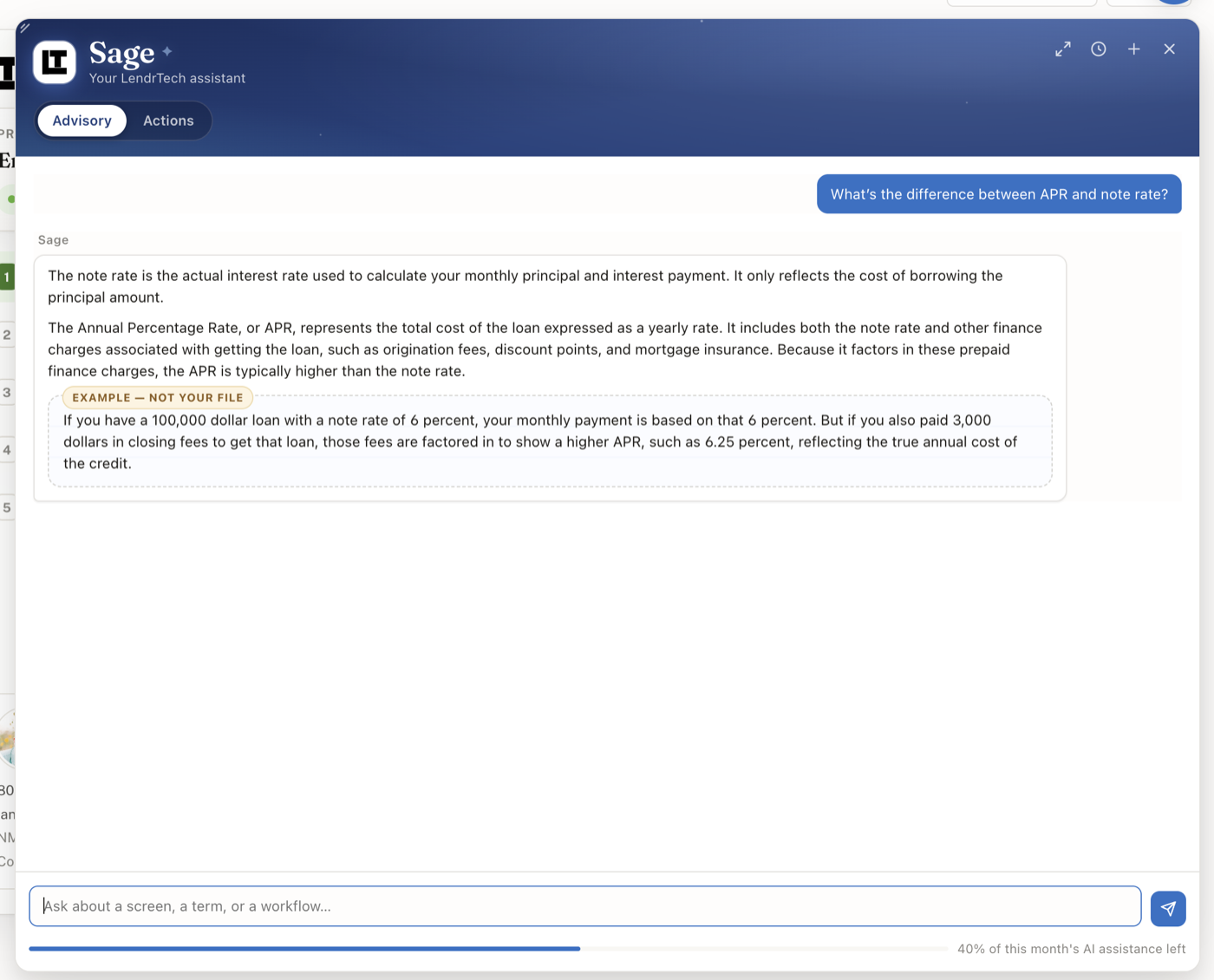
When a worked example genuinely helps, Sage invents round numbers for it and labels the whole thing — the example arrives inside a block marked Example — not your file, so an illustration can never be mistaken for your borrower’s figures at a glance.
Your chats stay with you
The conversation follows you as you move around the app, so you can ask on the client page and keep the thread going in the report builder. The + in the panel’s top-right corner starts a fresh chat, the history icon beside it (Past chats) reopens an earlier one, and the × closes the panel without losing anything.
Who gets it
Everyone with a LendrTech login. There’s nothing to switch on and no plan requirement — the bubble is simply there.
Asking Sage does draw on your monthly AI assistance, the single pool shared with the other places AI writes or builds for you in LendrTech; you’ll see it as a slim bar under the box you type in and in full under your billing settings. But answers are never switched off by it. If the pool runs dry, Sage still answers, and still walks you through doing the work yourself — it’s the building that pauses, not the help. How LendrTech uses AI lays out the whole picture, and usage and limits covers the meters.
Where to go next
- Meet Sage — the full guide, including what it declines and why
- How LendrTech uses AI — every AI surface in the product, and the lines each one won’t cross
- Mortgage glossary — the same concepts, in writing
- Stop typing fee sheets — the other place a model does work for you, with the same guardrail
Asked Sage something it fumbled? That’s worth knowing about — tell us at team@lendrtech.com.